

If you have already recorded a few episodes and want to know how to submit podcast to Apple Podcasts from India, the job is smaller than it looks. You need a host that gives you an RSS feed, square cover art, at least one published episode and an Apple Account. At Oskillo Studio in Jaipur we guide beginners through the podcast process, so here is the whole Apple route, in order.
This guide covers only Apple. If you have not set up the other platforms yet, you can do that separately, since the Apple steps below do not depend on them. The same RSS feed you build here also works for Spotify, so you do the hard part only once.
Key takeaways
- Apple does not host your audio. You host it elsewhere and Apple reads your RSS feed.
- You need at least one published episode, correct artwork and a public feed before you submit.
- Artwork must be 1400×1400 to 3000×3000 pixels, in JPEG or PNG.
- Approval is reported to take anywhere from 24 hours to 2 weeks, so plan for the long end.
- Hindi titles and descriptions are fine. Keep file names in plain English letters and numbers.
What do you need before you submit a podcast to Apple Podcasts?
Before you submit, you need an Apple Podcasts Connect account, a working RSS feed, at least one episode and proper cover art. Apple checks the feed technically when you submit. If any of these is missing, validation fails and you lose time. Use this checklist first.
| Item | What Apple expects |
|---|---|
| Account | Apple Podcasts Connect, signed in with an Apple Account (an iPhone is not required, Connect runs in a browser) |
| Feed format | RSS 2.0, publicly reachable, no password |
| Episodes | At least one published episode with its own enclosure (URL, length, type) |
| Episode ID | A GUID per episode that never changes |
| Explicit tag | An itunes:explicit value set to true or false |
| File names and URLs | ASCII only (a-z, A-Z, 0-9) |
| Artwork | 1400×1400 to 3000×3000 pixels, JPEG or PNG |
These Apple Podcasts RSS feed requirements come from Apple’s own podcast requirements page and its feed validation guide. One caution: some older guides say the itunes:owner email is mandatory. Apple’s technical update for hosting providers says that tag is no longer recommended, so do not panic if your host leaves it out.
How do you get an Apple Podcasts RSS feed in India?
You get an Apple Podcasts RSS feed by uploading your episodes to a podcast hosting service. The host creates the feed URL for you. This is the core of podcast distribution in India: one host, one feed, then you add the podcast to Apple Podcasts in India, Spotify and other apps using that same feed.
Many hosts offer a free plan, so searches like podcast hosting India free are common. Free is fine to start, but check three things before you pick one:
- Storage and bandwidth limits per month, since a 60-minute episode is a large file.
- Whether the feed is public and supports HTTP HEAD and byte-range requests, which Apple requires.
- Whether you can move your feed to another host later without losing listeners.
Apple also needs each episode to have a unique enclosure and a GUID that stays fixed forever. Good hosts handle both. Avoid editing episode IDs by hand or rebuilding the feed carelessly.
Set the show language to Hindi in your host settings if you record in Hindi. Write titles and descriptions in Devanagari, Roman Hindi or both. But name your audio files in English letters, for example episode-01-startup-story.mp3, never in Devanagari. Apple’s requirement for ASCII file names and URLs is easy to miss and it trips up a lot of Hindi creators.
If your audio still sounds rough, fix that before you publish, because the first episodes are what new listeners judge. Our editing team can clean it up for you, and the At Oskillo section below lists our editing rates.
What is the right Apple Podcasts artwork size for cover art?
Apple Podcasts cover art should be a square between 1400×1400 and 3000×3000 pixels, in JPEG or PNG. The largest size is preferred because it stays sharp on big screens. Pick 3000×3000 if your design tool allows it.
Per the guidelines summarised by 48hourslogo, artwork must not be blurry or pixelated and must not carry explicit language, placeholder images, Apple logos, or ads and sponsor logos. Check this before you upload.
File size is murkier. Some hosts, such as Transistor, ask for roughly 512 KB or less. That is host-level guidance, not a number we found on an Apple page, so follow your host’s limit and compress only as much as needed.
A practical design tip: your cover shows as a tiny thumbnail on a phone. Use a large show name, one clear face or symbol, and no more than two fonts. If your title is in Hindi, make the lettering thick enough to read at thumbnail size.
How to submit podcast to Apple Podcasts in Connect, step by step
To submit your show, open Apple Podcasts Connect, click Add (+), choose New Show, select Add a show with an RSS feed and paste your feed URL. Connect then validates the feed. If your host setup is correct, this step is quick.
- Publish at least one episode on your host and copy your public RSS feed URL.
- Open the Apple Podcasts Connect login page and sign in with your Apple Account.
- Click Add (+), then New Show.
- Choose Add a show with an RSS feed and paste the feed URL.
- Let Connect validate the feed. Fix any error it shows, then retry.
- Confirm your category choices. Apple lets you pick a primary and secondary category plus subcategories.
- Submit and watch the status message in Connect.
The steps match the submission walkthrough from a hosting service. If you see an Apple Podcasts validation failed message, remember that this check is purely technical for RSS shows. It is a technical check of your feed, not a review of your content.
Do not try to fix a problem by creating a second show or changing the feed URL. Podigee’s guidance on rejections warns against both, so read the status message in Connect and fix the cause at your host instead.
How long does Apple Podcasts approval take?
Apple Podcasts approval takes anywhere from 24 hours to about 2 weeks, according to a hosting service’s submission guide. Apple does not promise a fixed time. Plan for the long end, and do not announce a launch date until the show is live.
While you wait, keep the feed untouched. Check the status message in Connect once a day. Use the waiting time to edit your next two episodes.
Why was my podcast rejected, and how do I fix it?
Common causes of rejection are a missing episode, explicit language in titles or descriptions, or a feed error. Read the status message in Connect first. Apple’s technical validation and its content inspection are two separate steps, so the status message is the best place to start.
A troubleshooting guide from Podbean lists the usual causes: no published episode, and explicit or self-censored explicit words in titles, subtitles or descriptions. Here is our quick fix list:
- No episode: publish at least one and refresh the feed.
- Explicit words: remove them from titles and descriptions, even if you star out letters. Set the itunes:explicit tag honestly for the audio itself.
- Artwork: replace blurry, placeholder or sponsor-logo covers with a clean 3000×3000 image.
- Feed errors: confirm the feed opens without a password and file names use English letters and numbers only.
Fix the problem at your host and resubmit the same feed. Do not start a second show.
How do you claim your podcast in Apple Podcasts Connect?
To claim a show, open Connect, click More Actions, choose Claim Existing Show and follow the prompts to get a token. The token is valid for seven days. You paste it into your host, and Apple moves the show to your account, usually within 24 hours.
This matters because some hosts submit your feed to Apple for you. Until you claim it, such a show can sit under the host’s own Connect account. One host explains that its auto-submitted shows start this way, and others may work the same. Apple’s claim guide adds that you need access to change the RSS feed, so keep your host login safe.
How do Apple Podcasts charts work in India?
Apple Podcasts charts mainly reflect new follows over recent days, not total downloads. Podnews explains this, and Apple does not publish its formula. So nobody can honestly tell you a follower number that reaches the top. Check the Apple Podcasts India top charts yourself, and look at your category list as well as the main one.
India has an overall chart and category charts, including sub-lists such as Spirituality. Third-party analyses, such as this one from The Podcast Host, describe new follows from the past week, weighted towards the last 24 to 72 hours, so launch week matters. We cannot promise any chart position.
Hindi title and category tips for Apple Podcasts
You can submit a Hindi podcast to Apple Podcasts in India the same way as an English show, with no extra steps. Titles can use Devanagari, Roman letters or both. India’s fiction chart, for example, lists “Kahani Suno | कहानी सुनो”, so a mixed title is clearly workable. Roman spelling helps people who type in English. Devanagari helps those who search in Hindi.
- Set the show language to Hindi in your host.
- Keep file names and URLs in ASCII, as covered above.
- Pick a primary category that matches your topic, then a secondary one. Apple’s getting started page says to choose categories that help listeners find you.
- Write the first line of your description in plain words that tell a new listener what the show is about.
A first-week launch plan for a new show
The best first-week plan is to release three episodes together, then ask your own circle to follow the show in the first few days. Since charts lean on recent follows, a concentrated push works better than spreading it over a month. This is our own advice from working with new shows, not an Apple rule.
- Launch day: publish three episodes so new listeners can binge.
- Days 1-2: send the Apple link on WhatsApp and ask friends and clients to tap Follow.
- Days 3-5: post short reel clips on Instagram with the link in bio.
- Day 7: release episode four on a fixed weekday and keep that rhythm.
At Oskillo: how we prepare shows before they go live
At Oskillo Studio in Vaishali Nagar, Jaipur, we help you get the audio and episode exports ready before you submit anything. Our process runs from concept and strategy to pre-production, production and post-production. That covers audio mastering, thumbnails, captions and platform exports. With 100+ productions delivered, we know what a clean first episode needs before it goes to your host.
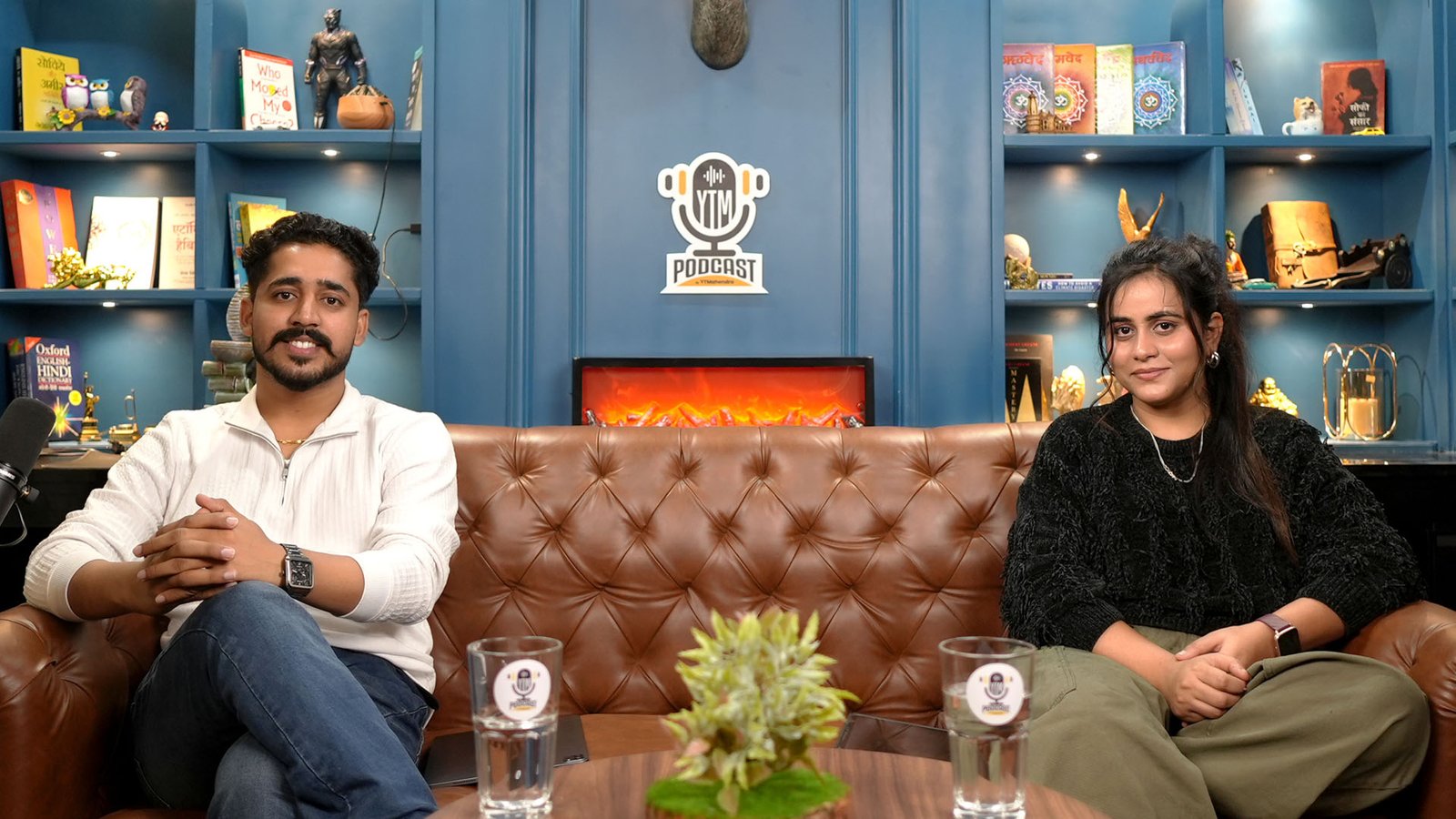
You can record in our soundproof rooms and get a clean first episode. The Economy Class Advance pack costs Rs 4,000 per hour and includes two Sony 4K cameras, a Shure mic, a recorder, lights and a technician. See the full podcast studio pricing in Jaipur. Our studio rental works with or without editing. Our Complete Podcast Edit costs Rs 10,000 and includes the main edit, a highlight, three reels with covers and two thumbnails. We also edit remotely for creators outside Jaipur. Questions about your setup? Check our FAQs or message us on WhatsApp.
Frequently asked questions
How do I submit my podcast to Apple Podcasts from India?
Host your episodes with a podcast host that gives you an RSS feed, then sign in to Apple Podcasts Connect. Click Add (+), choose New Show, select Add a show with an RSS feed and paste the feed URL. Apple validates the feed and then reviews the show. You can do this from India.
Is it free to submit a podcast to Apple Podcasts?
Apple does not charge a fee to submit a show through Apple Podcasts Connect. Your cost is the podcast hosting that creates your RSS feed. Many hosts have free plans with limits, so check storage, bandwidth and whether you can move your feed later before you commit.
How long does Apple Podcasts approval take?
Sources report a wide range. Apple generally accepts feeds within 24 hours to 2 weeks. We would not promise a fixed number to anyone. Submit early, keep your feed untouched while it is under review and read the status message in Connect for updates.
What size should podcast cover art be for Apple Podcasts?
Use a square image between 1400×1400 and 3000×3000 pixels in JPEG or PNG. The largest size is preferred. Avoid blurry images, explicit language, placeholder art, Apple logos, and ads or sponsor logos. Check your host’s file size limit too, as some ask for about 512 KB.
Can I submit a Hindi podcast to Apple Podcasts?
Yes. Hindi shows appear in Apple’s India charts, some with mixed Devanagari and Roman titles. Keep Hindi in your titles and descriptions, set the show language to Hindi in your host, and keep file names and URLs in plain English letters and numbers.
Do I need an iPhone to submit a podcast to Apple Podcasts?
You need an Apple Account, but not necessarily an iPhone. Apple Podcasts Connect works in a web browser, so you can submit from a laptop. It still helps to check how your show looks in the Apple Podcasts app once it goes live.
Apple Podcasts pe Hindi podcast ka naam Hindi mein rakhein ya English mein?
Dono chalte hain. India charts mein kuch shows ke naam Devanagari aur Roman dono mein hain, jaise mixed titles. Hum suggest karte hain ki naam aisa rakho jo log search kar sakein. File names hamesha English letters aur numbers mein rakho.
Book your session at Oskillo Studio
Soundproof sets, 2 Sony 4K cameras, Shure mics and an on-site technician in Vaishali Nagar, Jaipur. Studio rent starts at Rs 2,000 per hour.
WhatsApp +91 96101 80066 | See all prices | 3rd Floor, VR Theme Park, Gandhi Path, Vaishali Nagar, Jaipur